🔎 Word Search Maker
Paste your words, pick a grid size, and get a clean printable puzzle plus a separate answer key. Diagonal and backward words are toggles, so the same list works for 1st grade or 6th.
🖨️ Prints on one page ⚡ Instant preview 🆓 Free, no sign-up
Difficulty
What it prints
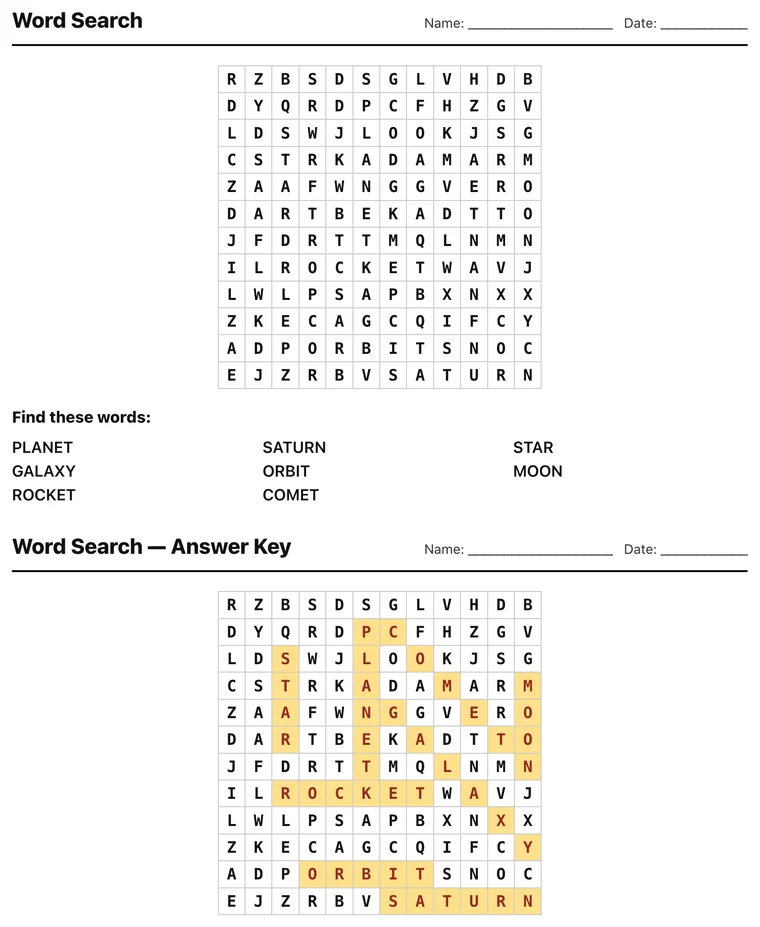
How to make a word search in 4 steps
- 1 Enter your words One per line, four to ten letters each. Spaces and hyphens are removed when the word is placed, so New York goes in as NEWYORK.
- 2 Set the grid size 8x8 for age five, 15x15 for age ten. The grid is the difficulty dial, not the word list.
- 3 Generate and check the key Every placed word is highlighted on the answer key, so you can confirm all of them are findable before printing.
- 4 Print the puzzle, keep the key Print the grid for the class and keep the highlighted copy. For a vocabulary lesson, hand out clues instead of the word list.
Grid size decides whether it is a puzzle or a punishment
A word search that is too big for the age turns into twenty minutes of scanning and a child who gives up. Too small and it is over in ninety seconds. The grid, not the word list, is the difficulty dial.
| Age | Grid | Words | Directions |
|---|---|---|---|
| 5 to 6 | 8x8 | 6 to 8 | Across and down only |
| 7 to 8 | 12x12 | 10 to 12 | Add diagonals |
| 9 to 11 | 15x15 | 14 to 18 | Add backwards |
| 12 and up | 18x18 or more | 20+ | All eight directions |
Where word searches actually help, and where they do not
Worth being honest about this, because word searches are the most over-used worksheet in the building. Finding a word in a grid is a visual scanning task. It does not teach spelling, it does not teach meaning, and a student can complete a perfect word search for a list of words they cannot define.
What they are genuinely good for: settling a class, the five minutes before a bell, a substitute lesson, early finishers, and building letter-pattern recognition in young readers who are still slow at decoding.
There is one way to make them teach something. Do not print the word list. Print the definitions or the clues instead, and let students work out the word before they hunt for it. That converts a scanning exercise into a vocabulary exercise and takes no extra work: type your words, then hand out the clue sheet separately.
Why the answer key matters more than it sounds
The generator highlights every placed word on a second copy of the grid. That is not a convenience feature, it is what makes the puzzle trustworthy.
Word searches generated by placing words randomly can produce a grid where a word is genuinely unfindable because another word overwrote a letter. With a highlighted key you can see at a glance that all fourteen words are actually in there before you print thirty copies.
The filler letters are not fully random either. Pure random fill produces accidental short words that students find and then argue about. Weighting the filler toward letters already used in the list makes the grid look coherent and cuts down on accidental words.
Word lists that produce good grids
Keep the words between four and ten letters. Three-letter words appear by accident constantly and make the key ambiguous. Words over twelve letters force a bigger grid than the age needs.
Mixed lengths beat uniform ones. A grid of fourteen six-letter words looks like a wall. A mix of four, six and nine letter words gives the eye something to anchor on.
Spaces and hyphens are stripped before placing, so New York goes in as NEWYORK. That is standard for word searches, but tell younger students, because they will look for the space.
Themes that give you a reason to use one
A word search is a filler unless the word list carries the lesson. Some lists that do real work:
The vocabulary of the unit currently being taught, handed out with definitions instead of the words. The names of the characters and places in the class reader, which quietly forces students to notice spellings they have been skimming past. The bones, the planets, the states, the elements: anything where the spelling is the point and the meaning is already known.
For language classes, put the target-language words in the grid and call the clues in English. Students have to retrieve the word before they can find it, which is the entire difference between a puzzle and a vocabulary exercise.
Lists that do not work: random seasonal words with no connection to anything, and new vocabulary introduced the same day. In the second case students are hunting for spellings they have never seen, which is slow and teaches nothing.
Frequently asked questions
What grid size should I pick?
For K-2, a 10×10 grid with 6-8 short words and no diagonals is the sweet spot. Grades 3-5 handle 15×15 with diagonals. If a word is longer than the grid is wide, the tool warns you and bumps the size up automatically.
How do I make the puzzle easier or harder?
Difficulty lives in three toggles: diagonal words, backward words, and grid size. All off plus a small grid is genuinely easy; all on in a 20×20 will keep adults busy. The word list itself matters less than people think.
Does it print the answer key on a separate page?
Yes. The key prints on its own page with the placed words highlighted, so you can hand out page one and keep page two. You can also turn the key off entirely.
Can words share letters in the grid?
Yes, the generator lets words cross where letters match, just like published puzzles. That's not a bug: crossings make the puzzle tighter and are why a 15×15 grid can hold 20 words.
Can I make a word search without giving away the word list?
Yes, and it is the single change that makes a word search teach something. Generate the puzzle, then hand out definitions or clues instead of the words. Students have to work out the word before they can hunt for it.
Why does the puzzle sometimes contain words I did not enter?
Filler letters occasionally line up into short real words by accident. It is unavoidable in any word search and it is why the answer key matters: only the highlighted words count. Bigger grids and longer word lists make it happen less.